For schools and mosques

Tests, lessons and Quran education for mosque and weekend school

Tests that mark themselves, lessons and tests made with AI from your own material, learning to read the Quran and Hifz, and the progress of every child, for the teacher and the parents.

What it brings

Less marking

Tests and homework are marked automatically, with a grade. Short answers too, even with a different spelling.

Less preparation

Make a lesson, presentation or test with AI from your own material: a draft that you check.

Learning tracks

Learning to read the Quran, prayer, fasting, umrah, manners, Arabic and Hifz: ready-made lessons for the board, workbooks and quizzes. Students go through every lesson again at home on their phone.

Every child in view

Grades, homework, attendance and Hifz per child. Parents see it too, and can report their child absent.

Tests

A real test: children type the answer themselves

Short answers are graded automatically, forgiving about spelling. Open questions are graded by the teacher with one click. Then a grade right away, and results can go to Excel.

  • Jibril, Jibreel and Djibriel are all correct
  • Open questions: 0, ½ or full marks
  • Grade 1–10, with or without a time limit
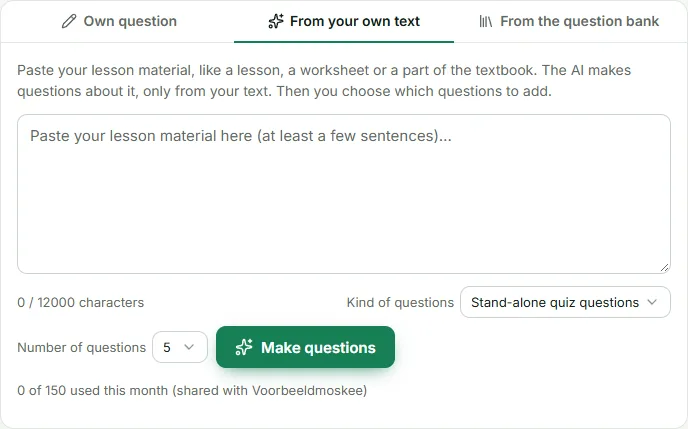
Tests made with AI

A test from your own material, in a minute

Paste the text of your lesson, a worksheet or a part of the textbook. Hikmoo turns it into questions, only from your text. You choose which ones to use and edit them; then it is a normal test or homework.

  • Only from your text, nothing made up
  • Always a draft: you check and choose
  • Or from the checked question bank, or entirely your own

Lessons and presentations

Your lesson as a presentation on the TV, also with AI

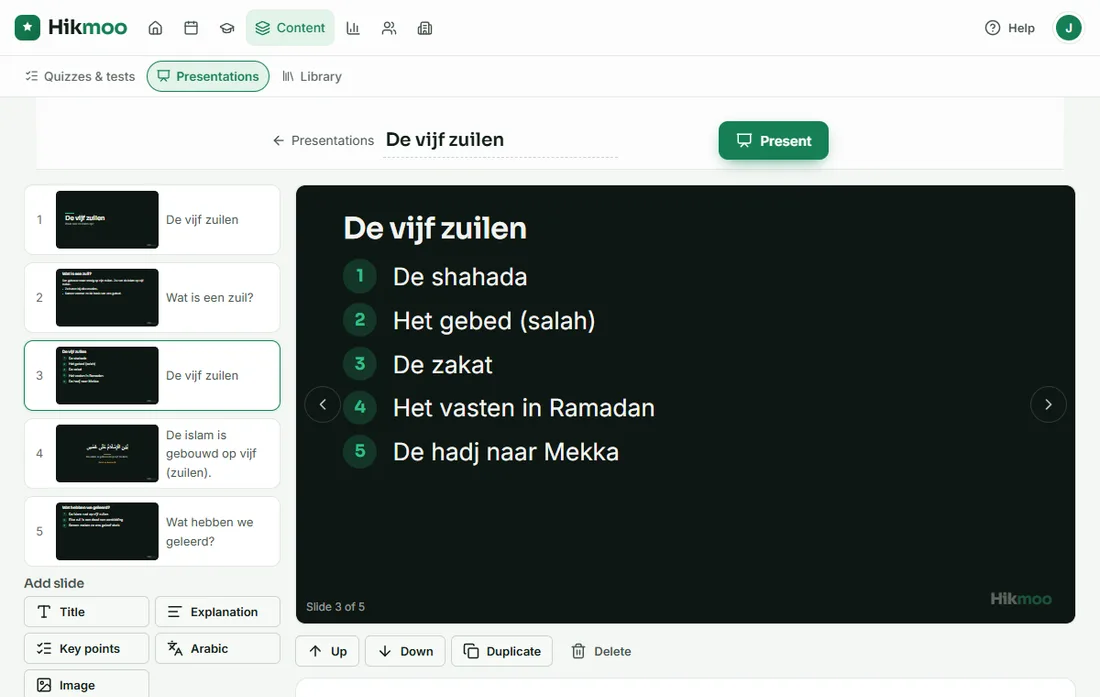
Make slides with titles, explanation, key points, Arabic and images, or let Hikmoo turn your lesson text into a presentation with a quiz and homework after it. In class you move through it with your phone, with your notes.

  • Make a lesson with AI from your own text (a draft you check)
  • Your phone as a remote, with your notes
  • After the lesson the quiz or homework with one tap
  • Statements: a question without a right or wrong answer, to open the conversation in class

Hikmoo Learning Tracks

Ready-made learning tracks: Quran, prayer, fasting, umrah, manners and Arabic

A learning track per subject, in modules, with goals, lessons for the board, print cards and workbooks. Children practise at home in the app, with a recording of every sound. For children in class, and for young people and adults.

  • Learning to read the Quran in 11 modules, with workbooks and 22 steps in the app
  • Learning to pray, to fast, umrah and Manners and character, with quizzes for children and for young people and adults, and Aṣl: understanding the language of the Qur'an
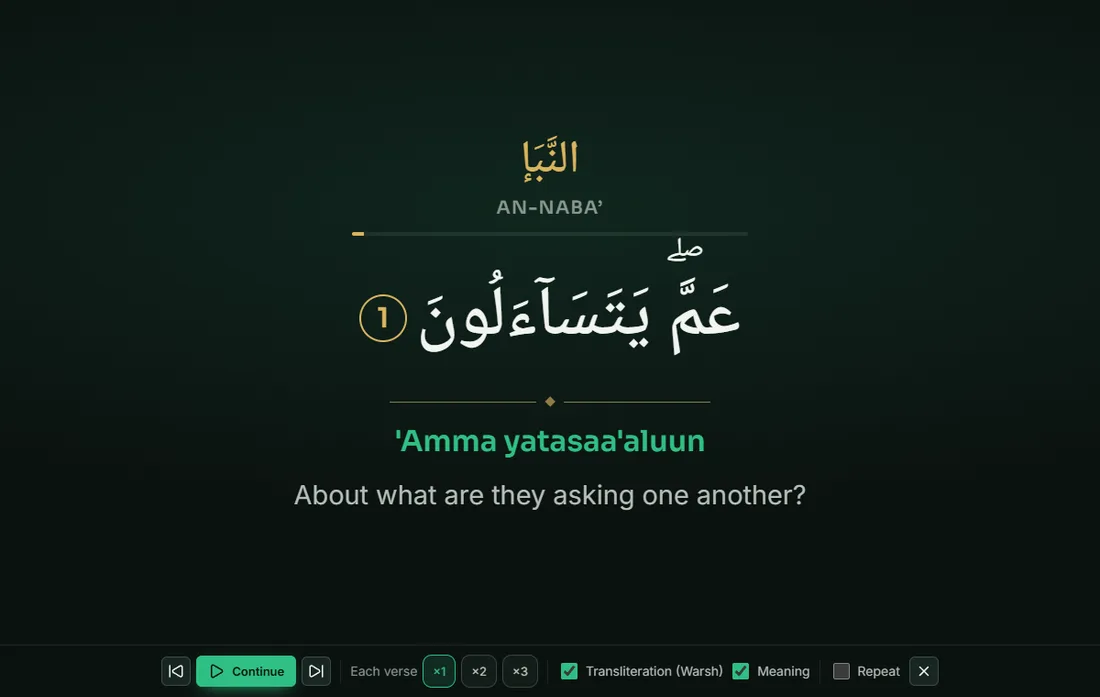
  • Hifz: recite Juz' 'Amma together on the TV, with transliteration and meaning
  • Learn on your own: students go through every lesson at home on their phone, step by step with questions along the way
  • See all learning tracks

Lesson planning

The whole lesson ready, start with one button

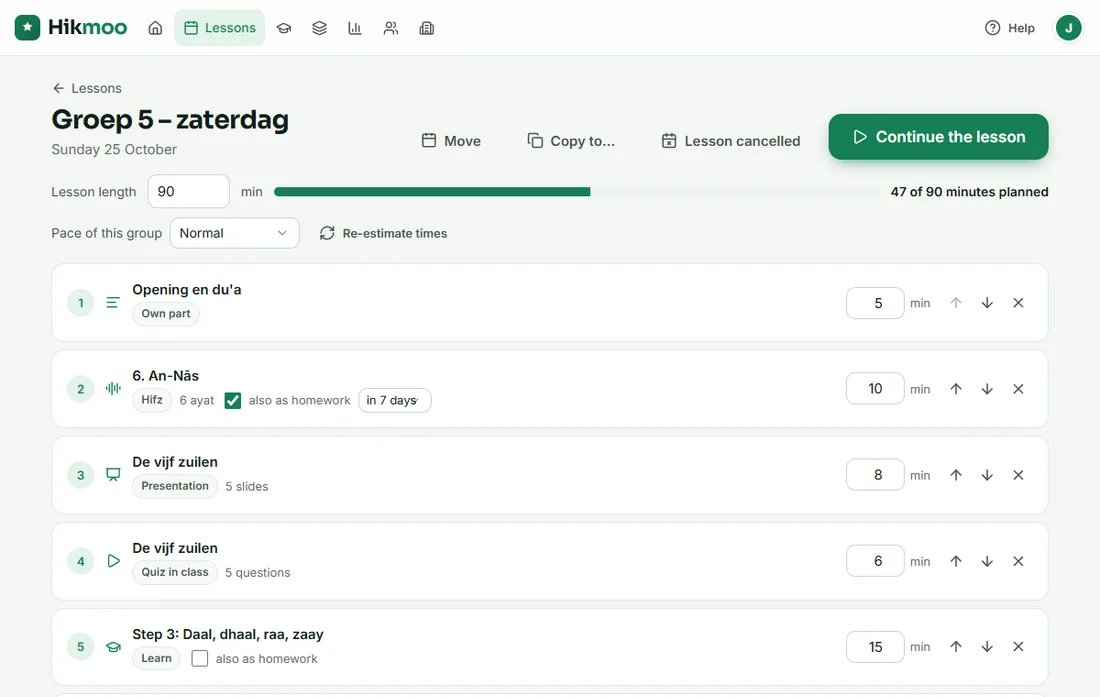
Put a lesson together from what you already have: a step of Learn, a surah for Hifz, your slides, a quiz and the homework. In class you go through the lesson from start to finish; you move through the slides with your phone as a remote control.

  • Lesson planner per group, with the time per part
  • Lesson material as slides on the TV, your phone as the remote
  • Copy a lesson to all groups, or move it to another day

Homework

Revise at home, and learn from mistakes right away

Pick a quiz and a due date and share the link with one button in the parents' WhatsApp group. After handing in, the child sees per question what was right, with the correct answer and the explanation.

  • Link and WhatsApp button
  • Explanations after handing in
  • Late? What was filled in is handed in automatically

Progress and parents

See how every child is doing, parents too

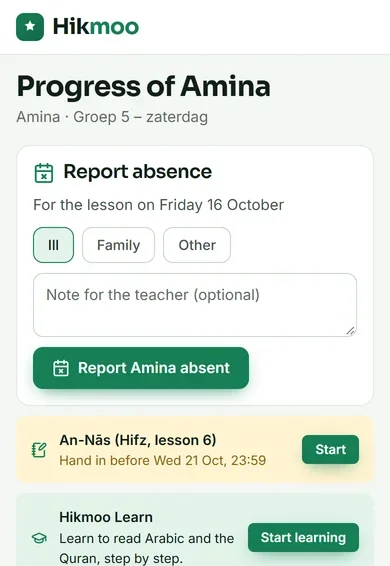
Progress per topic, test grades, homework, attendance and Hifz, with who needs attention. A report per child to print. Parents get their own link: they see the progress, report their child absent for the next lesson, and see right away when a lesson is cancelled.

  • Needs attention: low grades, missed homework, often absent
  • Report per child, print the whole class at once
  • Parent link: progress, reporting absence and cancelled lessons

Practice in class

Revise with a quiz on the TV

After the explanation, practise together: the question on the TV, the children answer on a phone or tablet. The lesson report shows which questions were hard, before the test.

  • Your own quizzes or the checked question bank
  • For the youngest: pictures as answers and reading aloud
  • Lesson report per question and per child

One account for the organisation

One account for the mosque, in your own branding

The school or mosque has the plan; every teacher who belongs to it gets it automatically. Teachers log in with their email, without a password. Students and parents see the logo, name and colours of your mosque.

  • Invite teachers, share quizzes and lessons with colleagues
  • Overview of classes and activity
  • Logo, name and colours of your mosque

Privacy, especially with children

Children don't need an account, just a first name
Only the teacher sees the results of their own class
Stored in the EU (Frankfurt), as little data as possible
No administration: registration, addresses and fees stay outside Hikmoo

Prices

Per year. Buy Class or group online right away with iDEAL or card; School/mosque by invoice.

Class or group

One teacher or leader with classes, courses or groups (up to 100 participants)
€199 per year
excl. VAT · €240.79 incl. 21% VAT
Classes, tests, homework, reports, photos, pictures, read-aloud, AI-made questions (Class 40×, School/mosque 150× per month), Hikmoo Learning Tracks with workbooks and lessons for the board, and everything for children: stories, colouring pages, Hikmoo sheets and worksheets
With iDEAL or card, with an invoice. No subscription: renew after a year if you like.

Frequently asked questions

Does every child need a phone?

No. In class you can use the school's tablets or phones, also taking turns. Or without phones at all: the board quiz with teams (the teacher ticks who was right) and a test on paper. Tests and homework also work on a shared tablet.

Do children need to create an account?

No. They type a code and pick their name from the class list. Only teachers log in, with a link by email.

Do we have to write all questions ourselves?

No. There is a question bank with thousands of checked questions. You can also make your own quizzes, with photos, pictures and questions from your own lesson text.

Does it work in English?

Yes, Hikmoo works in Dutch and English.

Does the AI make mistakes or make things up?

The AI only uses the text you paste, and everything is a draft: you check it, edit it and choose what to use. Only then do students see it.

Can parents see how their child is doing?

Yes. Every student has a link for the child and a parent link. Parents see grades, homework, attendance and Hifz, and can report their child absent for the next lesson. They only see their own child.

Not enough classrooms? Can we teach online too?

Yes. With an online lesson the teacher shares Hikmoo in Zoom or Teams, and the children join from home on their phone or laptop: quiz, Hifz, presentations and voting, with the same progress as in class. So a group can have an online lesson when no classroom is free. It is included in Class and School/mosque.

What if a lesson is cancelled?

The teacher sets the lesson to "Lesson cancelled" with a reason; the coordinator can do this for all classes at once (for example on a holiday). Parents see it right away on their link, and with one button the message is in the WhatsApp group. That day does not count for attendance.

For schools and mosques

Curious what Hikmoo can do for you?

Email us and we'll show you and help you get started.